Real-Time Accounting in Odoo: Posting Entries via the API
Post revenue into Odoo as it happens: create the draft invoice, post it, register the payment — with the idempotency and error checks a ledger demands.
ODXProxy Team · Aug 10, 2026 · 13 min read
The checkout finished, the card settled, the money is real. In Odoo it does not exist yet — not until
something writes it to the ledger. Real-time accounting in Odoo means closing that gap: your
transactional system creates and posts each invoice through the Odoo API as the event lands, instead
of dropping a CSV at 2am that somebody reconciles on Thursday. This guide walks the customer-invoice
path end to end through ODXProxy — resolve the customer, create the draft, post it, register the
payment — and then spends most of its words on the parts that actually bite: idempotency, the HTTP
200 that carries an error, and what to do when a post times out and you don't know whether it landed.
What "real-time" can and can't mean in Odoo
Odoo has no streaming ingest and no push API. "Real-time" here means one synchronous write per business event, seconds behind reality — not sub-second, and not a firehose.
That distinction matters because posting an accounting entry is expensive ORM work. A single
action_post allocates a sequence number, computes taxes, converts currency, builds the balancing
lines, and fires whatever automation the customer has bolted on. It is nothing like a search_read.
Two consequences shape everything below:
- Keep it off the user's critical path. Enqueue the event, return to the checkout, and let a worker do the Odoo write. A customer should never wait on a journal entry.
- Bound it. Give the call an explicit timeout so a slow ERP degrades your queue rather than your
storefront. ODXProxy takes an
x-request-timeoutheader in seconds (default15).
The models you'll touch
account.move— the accounting document itself.move_typedecides what it is:out_invoice(customer invoice),in_invoice(vendor bill),out_refund(credit note), orentry(a plain journal entry).staterunsdraft→posted→cancel.account.move.line— the lines, created through theinvoice_line_idsone2many on the move.account.payment.register— a wizard, not a stored document. It is how Odoo turns "this invoice got paid" into anaccount.paymentplus the reconciliation.
Two fields on account.move earn their keep in an integration: ref (a free-text Reference,
indexed, and the natural home for your external transaction id) and invoice_origin (the source
document, e.g. your order number).
The shape of the flow: draft, then post
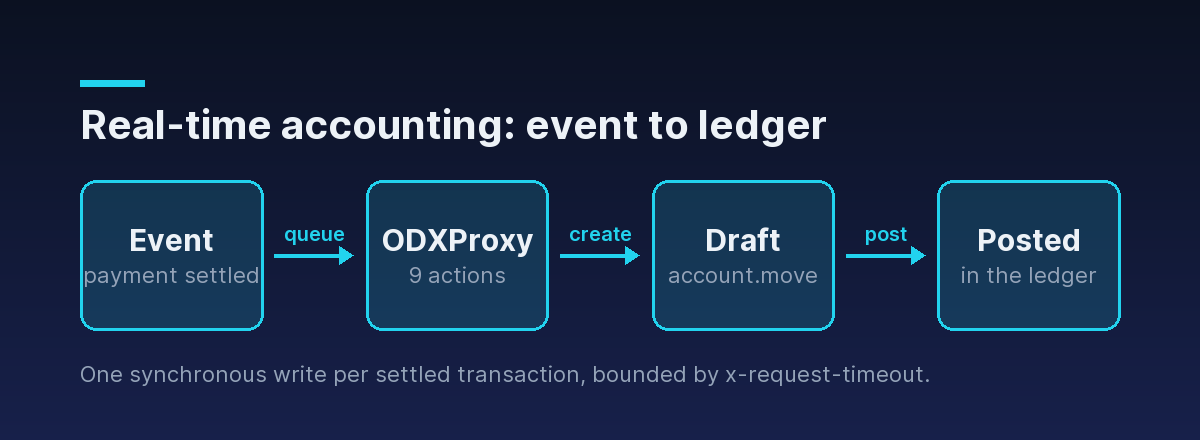
Resist the urge to make invoicing one call. Odoo splits it deliberately, and so should you:
createthe move — it lands indraft, which is cheap, editable, and deletable.- Verify the draft says what you think it says.
action_postit — now it has a sequence number and it's in the books.
A draft you got wrong is a write away from correct. A posted move you got wrong needs a reset or a
credit note, and on a locked period you may not be able to touch it at all. The two-phase shape is
your last cheap checkpoint.
Step 1 — resolve the customer
Start by mapping your customer to a res.partner id. Match on whatever stable key you sync on — an
email, or better, an external reference you wrote into ref:
{
  "id": "partner-lookup-1",
  "action": "search_read",
  "model_id": "res.partner",
  "params": [[["email", "=", "ada@example.com"]]],
  "keyword": { "fields": ["name", "email", "property_account_receivable_id"], "limit": 1 },
  "odoo_instance": {
    "url": "https://erp.example.com",
    "db": "prod",
    "user_id": 2,
    "api_key": "<the Odoo user API key>"
  }
}
That odoo_instance block carries the Odoo user's API key. The proxy's own key rides in the
x-api-key header and is a completely separate secret — never interchange the two. Subsequent
examples omit the block for brevity; every request still carries it.
If the lookup returns nothing, create the partner first. Do not let Odoo auto-create one as a side effect of invoicing — you'll end up with duplicate contacts and a receivable ledger nobody can read.
Step 2 — create the draft invoice
create is one of the nine directly callable actions, so the invoice and all of its lines go in a
single round trip. One2many lines use Odoo's command-triple form — [0, 0, {…}] means "create a new
related record from this dict":
{
  "id": "inv-create-1",
  "action": "create",
  "model_id": "account.move",
  "params": [{
    "move_type": "out_invoice",
    "partner_id": 214,
    "invoice_date": "2026-08-10",
    "ref": "stripe:pi_3PqX2s1e2fGh",
    "invoice_origin": "WEB-10482",
    "invoice_line_ids": [
      [0, 0, { "product_id": 87, "quantity": 2, "price_unit": 49.0 }],
      [0, 0, { "name": "Expedited shipping", "quantity": 1, "price_unit": 12.5 }]
    ]
  }],
  "keyword": {}
}
The response is the new move's id:
{ "jsonrpc": "2.0", "id": "inv-create-1", "result": 5183 }Two things worth knowing about that payload. First, you did not have to specify accounts or taxes.
On modern Odoo, account_id, tax_ids, and price_unit on a move line are computed fields declared
with store=True, readonly=False, precompute=True, so they are derived from the product at create
time even over the API, with no onchange emulation on your side. Pass them explicitly only when you
need to override the product defaults — taxes take the replace command, [[6, 0, [tax_id]]].
Second, the move has no invoice number yet. name only takes its sequence value when the move is
posted; in draft it is empty. If you need a reference to show the customer before posting, use your
own ref.
ref on the way in, not in a comment or a custom field you add later. It is indexed, it survives upgrades, and every idempotency check in this article keys off it.Step 3 — read the draft back before you post
This is the checkpoint people skip and regret. Read the totals Odoo computed and compare them against the amount you actually charged:
{
  "id": "inv-verify-1",
  "action": "read",
  "model_id": "account.move",
  "params": [[5183], ["name", "state", "amount_untaxed", "amount_tax", "amount_total", "currency_id"]],
  "keyword": {}
}
If amount_total doesn't match the settled payment to the cent, stop. A mismatch means a fiscal
position, price list, or tax configuration on the Odoo side disagrees with your checkout — and the
draft is still free to fix or delete. Posting first and reconciling later turns a config bug into an
accounting correction.
Step 4 — post it
Posting is not one of the nine direct actions, so it goes through call_method with an explicit
fn_name. Like every recordset method, the id list is the first positional argument:
{
  "id": "inv-post-1",
  "action": "call_method",
  "model_id": "account.move",
  "fn_name": "action_post",
  "params": [[5183]],
  "keyword": {}
}
On success it returns true, state flips to posted, and name picks up its sequence
(INV/2026/00042). The revenue is now in the books. The mechanics of call_method — why params
starts with a list of ids, what comes back — are covered in
calling custom Odoo methods with call_method.
Idempotency: a ledger is not a table you can dedupe later
Every queue you will ever build delivers twice. In most integrations a duplicate is an untidy row; in accounting it is overstated revenue and a customer who thinks they were billed twice.
Odoo will not save you here. There is no unique SQL constraint on ref — newer versions compute a
duplicated_ref_ids warning for the UI, but nothing blocks a duplicate arriving over the API. The
guard is yours, and it is one cheap call before the create:
{
  "id": "idem-1",
  "action": "search_count",
  "model_id": "account.move",
  "params": [[
    ["ref", "=", "stripe:pi_3PqX2s1e2fGh"],
    ["move_type", "=", "out_invoice"],
    ["state", "!=", "cancel"]
  ]],
  "keyword": {}
}
A non-zero count means this event already produced an invoice: skip it, don't create a second one.
0 and both create an invoice. Serialize on the idempotency key in your queue — a unique index on the event id in your own database, or a per-key lock — and treat the search_count as a second line of defence, not the only one.The HTTP 200 trap, with money on it
Odoo returns logic errors with HTTP 200 and a populated error object. Only proxy-layer failures
get a non-200 status. Accounting is where this hurts most, because the failures are routine: a closed
period, a missing receivable account, a tax that doesn't exist in that company.
Post into a locked period and you get a perfectly successful-looking HTTP response:
{
  "jsonrpc": "2.0",
  "id": "inv-post-1",
  "error": {
    "code": 200,
    "message": "You cannot add/modify entries prior to and inclusive of the lock date.",
    "data": { "name": "odoo.exceptions.UserError" }
  }
}
Code that checks response.ok and moves on has just dropped an invoice on the floor, silently, and
your month-end will be short by exactly that amount. So the check is always two steps: status first
(a non-200 with -32003/-32004 is a timeout or gateway problem, -32000 is auth), then the
error field even on a 200, and only then trust result. The reusable handler is in
Odoo API error handling.
Timeouts and the duplicate-posting hazard
A timeout is the one failure where you genuinely do not know what happened. Odoo may have committed the move and simply not answered in time.
Bound the call explicitly, sized to the work — a post deserves more headroom than a read:
curl -X POST https://your-proxy.example.com/api/odoo/execute \
  -H "Content-Type: application/json" \
  -H "x-api-key: $ODX_PROXY_KEY" \
  -H "x-request-timeout: 30" \
  -d '{
    "id": "inv-post-1",
    "action": "call_method",
    "model_id": "account.move",
    "fn_name": "action_post",
    "params": [[5183]],
    "keyword": {},
    "odoo_instance": {
      "url": "https://erp.example.com", "db": "prod",
      "user_id": 2, "api_key": "<the Odoo user API key>"
    }
  }'
When that comes back -32003, never blind-retry the create. Re-run the search_count on ref
first: if the invoice exists, resume from wherever it got to (read its state; post it if it's still
draft). Retrying a post is safer than retrying a create — posting an already-posted move raises a
UserError rather than duplicating anything — but the lookup costs one call and removes the guesswork
entirely.
Step 5 — register the payment
The invoice is posted and payment_state reads not_paid. Marking it paid means driving the same
wizard the accountant would use, in two calls.
First create the wizard record, passing the invoice through the context — the wizard reads
active_model and active_ids in its default_get to work out what it's paying:
{
  "id": "pay-1",
  "action": "create",
  "model_id": "account.payment.register",
  "params": [{
    "payment_date": "2026-08-10",
    "amount": 110.5,
    "journal_id": 7,
    "communication": "stripe:pi_3PqX2s1e2fGh"
  }],
  "keyword": {
    "context": { "active_model": "account.move", "active_ids": [5183] }
  }
}
Then call action_create_payments on the wizard id that came back:
{
  "id": "pay-2",
  "action": "call_method",
  "model_id": "account.payment.register",
  "fn_name": "action_create_payments",
  "params": [[91]],
  "keyword": {}
}
That method returns an ir.actions.act_window dictionary describing the payments it created — the
same window Odoo would open for a human. Don't parse it for status. Read the invoice instead:
{
  "id": "pay-verify-1",
  "action": "read",
  "model_id": "account.move",
  "params": [[5183], ["payment_state", "amount_residual"]],
  "keyword": {}
}
payment_state is the answer you want: paid, partial, in_payment (received, not yet reconciled
against the bank), or still not_paid. Pair it with amount_residual and you have the whole picture.
journal_id and Odoo picks a default journal. On a multi-currency or multi-journal setup that default is rarely the one you meant — pass it explicitly and map your payment providers to journals once, in config, not in code.Pure journal entries, for ledger-style systems
If you're not invoicing — a payments platform posting settlement, fees, and payouts — you want
move_type: "entry" and the line_ids one2many, with debits and credits you balance yourself:
{
  "id": "je-1",
  "action": "create",
  "model_id": "account.move",
  "params": [{
    "move_type": "entry",
    "date": "2026-08-10",
    "journal_id": 3,
    "ref": "settlement:2026-08-10:acct_19f2",
    "line_ids": [
      [0, 0, { "account_id": 17, "name": "Settlement received", "debit": 980.0, "credit": 0.0 }],
      [0, 0, { "account_id": 42, "name": "Processor fee",       "debit": 20.0,  "credit": 0.0 }],
      [0, 0, { "account_id": 58, "name": "Gross sales",         "debit": 0.0,   "credit": 1000.0 }]
    ]
  }],
  "keyword": {}
}
Same rules apply, with one addition: the entry must balance. Total debits ≠ total credits raises a
UserError on post — arriving, as always, as an HTTP 200 with a populated error.
When Odoo says no: queue, don't drop
Sort every failure into two buckets, because they need opposite handling:
- Transient —
-32003(timeout),-32004(bad gateway), Odoo restarting, a worker pool saturated at month-end. Retry with exponential backoff, reusing the sameref, after the existence check. - Deterministic — locked period, missing account, tax not found, access denied (
-32000is the proxy's auth failure; Odoo's own access errors arrive as a200with anAccessError). Retrying changes nothing. Dead-letter it with the full request and theerrorpayload attached, and page a human.
The one thing you must never do is drop the event. An accounting integration's real contract is that every settled transaction eventually reaches the ledger exactly once — late and visible beats fast and lossy.
Where the proxy actually helps
None of the above is magic, and a gateway doesn't make Odoo faster. What it does change:
x-request-timeoutper call, so a heavy post degrades your queue rather than hanging a worker indefinitely.- An allowlist of nine actions, so the service that posts revenue can't be repurposed to
unlinkhalf a database if its credentials leak. - Two separate secrets — the proxy key your payments service holds, and the Odoo user key behind it — so the app tier never carries ERP-wide credentials.
- One error catalog across every instance you write to, instead of per-integration fault decoding.
ODXProxy is early (v0.1.0), so treat anything beyond the shipped request/response contract as roadmap rather than something to design against today.
Putting it together
- Resolve the partner — never let invoicing auto-create contacts.
search_countonrefbefore you write anything.createtheaccount.movein draft, lines as[0, 0, {…}]triples.- Read it back and reconcile
amount_totalagainst what you charged. call_method→action_postto put it in the books.- Register the payment via the wizard:
createwithactive_idsin context, thenaction_create_payments. - Verify with
payment_stateandamount_residual. - Check
erroron every 200, and classify failures before retrying.
The happy path is six calls. The other 90% of the work — the idempotency key, the two-step error check, the timeout policy — is what separates an integration that closes the month from one that quietly loses a day of revenue.
Where to go next
- This is one spoke of our Odoo API integration guide; the same find-write-validate rhythm drives receiving a purchase order.
- Syncing with a second accounting system instead of feeding one? See Odoo Xero integration and the general Odoo data sync patterns.
- The two checks this article leans on hardest: Odoo API error handling and reaching past CRUD with call_method.
- Full request envelope in the API reference, the nine actions and the
fn_namerule in the actions reference. - Let the Python SDK carry the envelope so your worker reads as
session.call_method("action_post", [[move_id]]).