Odoo /web/session/authenticate: Sessions vs API Keys
Odoo's /web/session/authenticate logs in and returns a session cookie. Here's the request shape, why sessions break server integrations, and the stateless fix.
ODXProxy Team · Aug 26, 2026 · 10 min read
If you have gone looking for how to log into Odoo from code, you have almost certainly landed on
/web/session/authenticate. It is the route the web client itself uses, it accepts a plain
db/login/password body, and it works on the first try from curl — which is exactly why so many
integrations get built on top of it and then fail three weeks later at four in the morning. This guide
covers what that endpoint really does, the request and response shape in full, the five ways session
authentication breaks once a service depends on it, and the stateless alternative you should be using
for anything that runs unattended.
What /web/session/authenticate actually does
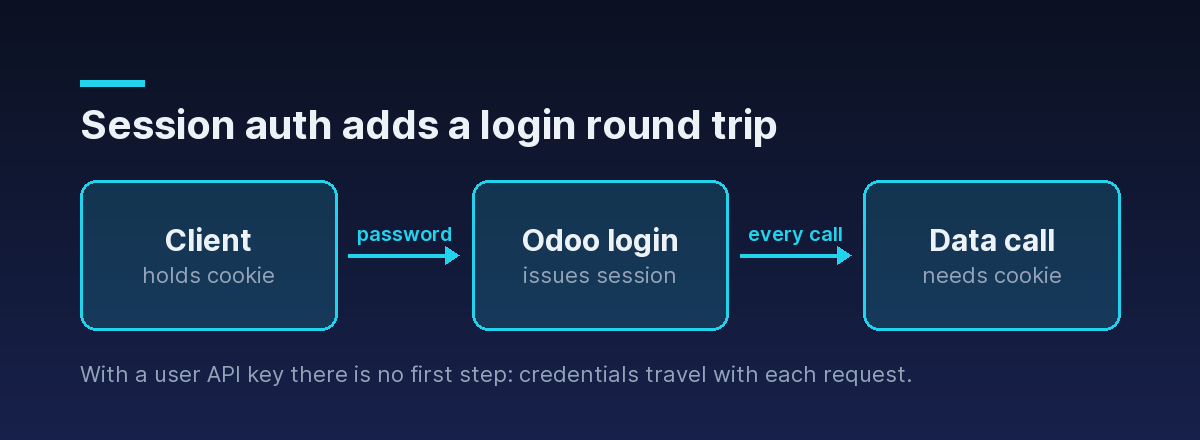
It is a login endpoint, not a data endpoint. You POST credentials, Odoo verifies them, creates a
server-side session record, and hands you back a session_id cookie. Every subsequent request you make
carrying that cookie is treated as that logged-in user — the same mechanism your browser uses after you
type your password into the Odoo login form.
Two properties follow from that, and both matter:
- It is stateful. The session lives on the Odoo server, not in your request. Your client holds only a pointer to it, and that pointer can be invalidated by things happening on the other side.
- It is part of the web client's surface, not the External API. It exists so a browser can hold a login across page loads. Nothing about it is designed for a worker process.
Despite the shape of the URL, the endpoint speaks JSON-RPC 2.0, like the rest of Odoo's JSON surface —
not REST. The method is always call; what you are calling is identified by the route.
The request shape
A single POST with a JSON-RPC envelope. The credentials go in params:
curl -X POST https://erp.example.com/web/session/authenticate \
  -H "content-type: application/json" \
  -c cookies.txt \
  -d '{
    "jsonrpc": "2.0",
    "method": "call",
    "params": {
      "db": "prod",
      "login": "integration@example.com",
      "password": "<the user password>"
    }
  }'
Three fields, all required. db is the database name — if your server runs several, this is the same name
you would pick from Odoo's database selector, and getting it wrong is its own class of failure covered in
running Odoo with multiple databases and dbfilter. The -c cookies.txt flag is the important part of that command: it saves the cookie jar, because the cookie is
the thing you came for.
What comes back — and where the session actually lives
A successful login returns HTTP 200 with a result object describing the user:
{
  "jsonrpc": "2.0",
  "id": null,
  "result": {
    "uid": 7,
    "username": "integration@example.com",
    "db": "prod",
    "server_version": "17.0",
    "is_admin": false,
    "is_system": false,
    "user_context": { "lang": "en_US", "tz": "Europe/Brussels", "uid": 7 }
  }
}
The genuinely useful field here is uid — the numeric user id, which you need for every External API
call regardless of which authentication style you settle on. Worth reading once and writing down.
What you will not reliably find is the session token in the body. The session travels as a cookie in the response headers:
Set-Cookie: session_id=8f2c...; HttpOnly; Path=/session_id field inside result, and a lot of blog code still reads it from there. Do not depend on it — on current versions that field may be absent, and the Set-Cookie header is the authoritative source. If your client library discards cookies by default, you will get a clean 200 from the login and an authentication error from the very next call.A failed login also returns HTTP 200. The body carries an error object instead of result:
{
  "jsonrpc": "2.0",
  "id": null,
  "error": {
    "code": 200,
    "message": "Odoo Server Error",
    "data": {
      "name": "odoo.exceptions.AccessDenied",
      "message": "Access denied"
    }
  }
}
Note that "code": 200 is Odoo's own error code, not an HTTP status — the two just happen to collide on
this route, which is confusing the first time you see it. This is the single most important habit to build
when working with any Odoo JSON endpoint: check the status, then check for error anyway. There is a
fuller treatment in handling Odoo API errors properly.
Keeping a session alive in code
If you are going to do this, do it with a session-aware HTTP client so the cookie jar is handled for you:
import requests

ODOO_URL = "https://erp.example.com"

session = requests.Session()

resp = session.post(
    f"{ODOO_URL}/web/session/authenticate",
    json={
        "jsonrpc": "2.0",
        "method": "call",
        "params": {
            "db": "prod",
            "login": "integration@example.com",
            "password": "<the user password>",
        },
    },
    timeout=15,
)
resp.raise_for_status()

payload = resp.json()
if "error" in payload:
    raise RuntimeError(f"Login failed: {payload['error']['data']['message']}")

uid = payload["result"]["uid"]
print("logged in as uid", uid, "| cookie:", session.cookies.get("session_id") is not None)
requests.Session persists the cookie across calls, so subsequent requests through that same session
object ride on the login. That is the whole trick, and it works — right up until one of the following
happens.
Five ways session auth breaks in production
1. The session expires on someone else's schedule. Sessions have a server-side lifetime and are garbage collected. Your process did not decide that lifetime and gets no warning before it lapses. The classic symptom is a job that passes every test, runs fine for days, and then starts failing overnight with a session-expired error — because nothing re-authenticated.
2. The session gets invalidated out from under you. A password change on that account, a logout in a browser somewhere, or an Odoo restart that clears the session store all kill a session that your service is still holding. None of these are events your integration can observe.
3. Cookie jars do not survive process boundaries. One requests.Session lives in one process. Scale to
four workers and you have four logins; add a job queue and every worker needs its own login-and-retry
logic. You are now operating authentication state — persisting it, refreshing it, and racing on it — which
is work that produces no product value.
4. Two-factor authentication refuses the route outright. Enable 2FA on the account and password login
through this endpoint stops working, because there is no place in that three-field params object for a
TOTP code. This is not a bug to route around; it is the security model telling you to use a key instead.
Odoo two-factor authentication and API access walks through what
does work.
5. Sessions and load balancers disagree. Odoo stores sessions on the filesystem by default. Put two Odoo nodes behind a proxy without a shared session store and a login issued by node A is meaningless to node B, so requests fail intermittently depending on where they land. Fixing it means sticky sessions or shared storage — real infrastructure you are adding purely to keep a cookie meaningful. Getting the proxy layer right in the first place is covered in running Odoo behind an Nginx reverse proxy.
Every one of these is a consequence of the same root cause: the session is state, it lives somewhere else, and you do not control its lifecycle.
The stateless alternative: credentials on every call
Odoo's External API takes the opposite approach. There is no login step and no cookie — each call carries the database, the user id, and an API key, so any request is complete on its own:
{
  "jsonrpc": "2.0",
  "method": "call",
  "params": {
    "service": "object",
    "method": "execute_kw",
    "args": [
      "prod", 7, "<the Odoo user API key>",
      "res.partner", "search_read",
      [[["is_company", "=", true]]],
      { "fields": ["name", "email"], "limit": 50 }
    ]
  },
  "id": 1
}
An API key is generated per user from their Odoo preferences, is revocable on its own without touching anyone's password, and — critically — works with 2FA enabled. Nothing expires mid-job, nothing needs refreshing, and a worker pool of any size behaves identically to a single process. The full credential model is in how to authenticate to the Odoo API.
The price is that args array: seven order-sensitive positional elements, with the domain nested a level
deeper than feels natural, and no restriction on which model methods a caller may reach.
No session at all: the same call through a proxy
Flattening that is precisely what ODXProxy does. It exposes one endpoint, takes named fields instead of positional arguments, and carries the target instance's credentials in the request body — so there is still no session anywhere in the picture:
{
  "id": "01J9Z8K3QJ7Y5T2N6V4W8X0ABC",
  "action": "search_read",
  "model_id": "res.partner",
  "params": [[["is_company", "=", true]]],
  "keyword": { "fields": ["name", "email"], "limit": 50 },
  "odoo_instance": {
    "url": "https://erp.example.com",
    "db": "prod",
    "user_id": 7,
    "api_key": "<the Odoo user API key>"
  }
}
Sent as:
curl -X POST https://proxy.example.com/api/odoo/execute \
  -H "x-api-key: <the proxy API key>" \
  -H "content-type: application/json" \
  -d @request.json
Three things are worth pulling out.
Your services hold one secret, not a login. x-api-key authenticates the caller to the proxy;
odoo_instance.api_key is the Odoo user's key and is what Odoo checks. They are two different values and
must never be conflated — a 401 with code -32000 means the first is wrong, while an Odoo access error
arrives with HTTP 200 and an error object.
Multi-instance routing costs nothing extra. With sessions, talking to staging and production means two cookie jars with independent lifecycles. Here the instance is a field in the body, so one client reaches any number of Odoo servers without holding state for any of them.
The callable surface is bounded. Nine actions are directly available — search_count, search, read,
fields_get, search_read, create, write, unlink, and call_method. Anything beyond those goes
through call_method with a non-empty fn_name; see
calling arbitrary Odoo methods with call_method. A borrowed browser session, by
contrast, can reach every method the logged-in user can reach.
You still apply the same two-step check to the response — status first, then error, because a 200 can
carry an Odoo logic error verbatim:
resp = requests.post(url, headers=headers, json=body, timeout=20)

if resp.status_code != 200:
    raise RuntimeError(f"Proxy error {resp.status_code}: {resp.text}")

payload = resp.json()
if payload.get("error"):
    err = payload["error"]
    raise RuntimeError(f"Odoo error {err['code']}: {err['message']}")

partners = payload["result"]When session auth is genuinely the right call
It is not always wrong. Reach for /web/session/authenticate when:
- You are automating the web client itself — an end-to-end browser test, a UI scraper, or anything that legitimately needs to be a logged-in browser.
- You are exploring interactively, poking at an endpoint from
curlto see what a response looks like before writing the real client. - You need a controller that only exists in the web surface and has no External API equivalent.
For anything scheduled, queued, containerized, or otherwise expected to run without a human present, use a user API key and keep every request self-contained.
Where to go next
- Get the credential model right in how to authenticate to the Odoo API.
- Understand the sibling browser route in Odoo /web/dataset/call_kw vs the External API.
- See why key-based auth is mandatory once 2FA is on in Odoo two-factor authentication and API access.
- Map the whole surface in the Odoo API endpoints reference.
- Read the exact request and response contract in the API reference, or start from the Python SDK.